
A marriage, new child, or loss of other coverage can leave employees needing answers about their benefits when timing matters. For HR and payroll teams, mid-year election changes can become complicated when employees assume every qualifying life event permits any requested adjustment. The written cafeteria plan and applicable rules determine what changes may be allowed.
Employees should receive timely, consistent guidance that helps them understand their options and maintain confidence in their enhanced benefits. Clear procedures also help the organization avoid payroll adjustments that do not align with the plan’s requirements, supporting the trust that contributes to retention.
Begin with the plan’s permitted events, compare each requested change with the circumstances involved, and confirm that HR and payroll follow a consistent review process. Employees should also know where to ask questions and what documentation may be required.
Direct answer
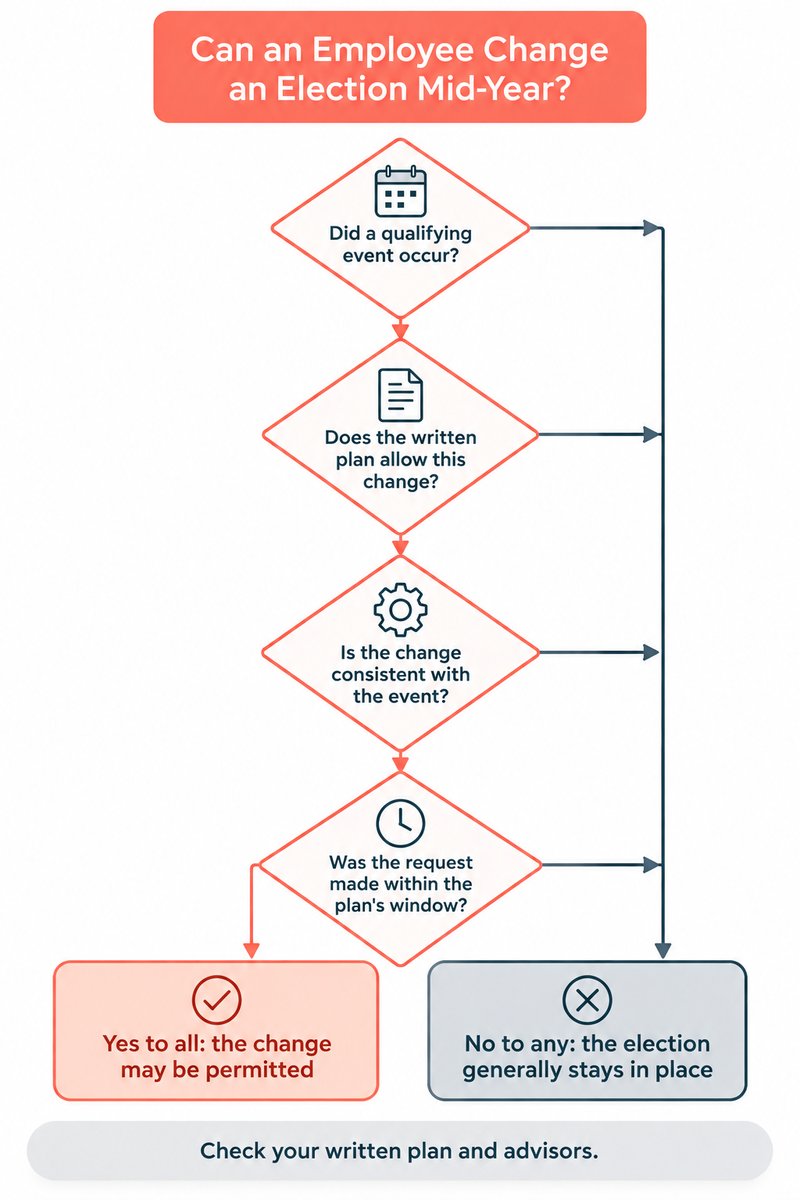
Can employees change pre-tax elections in the middle of the plan year? Generally, pre-tax elections under a cafeteria plan are fixed for the plan year. A mid-year change is generally permitted only when the written plan allows it, the employee experiences a qualifying event, and the requested change is consistent with that event. Simply wanting more take-home pay or changing one’s mind is generally not enough.
Why the written plan comes first
Federal rules identify events that may permit mid-year election changes, but an employer’s cafeteria plan can allow only the changes adopted in its written plan document. That means two employers may handle the same employee request differently because their plan documents contain different provisions.
This is why a clear, current Section 125 plan document matters. It provides HR, payroll, and employees with guidance on which changes are permitted, what documentation may be required, and when requests must be submitted.
What a qualifying life event can generally allow
Commonly recognized categories include:
- Change in status. Examples include marriage, divorce, birth or adoption, death of a spouse or dependent, a change in employment status affecting eligibility, or a dependent gaining or losing eligibility.
- Special enrollment rights. Certain events, such as gaining a new dependent or losing other coverage, may create a right to enroll in the group health plan, along with a corresponding election change.
- Certain cost or coverage changes. Some plans permit election adjustments when the cost or coverage of a benefit changes significantly. The applicable rules vary by benefit type.
- Other recognized events. Examples include certain court orders involving a child’s coverage and entitlement to Medicare or Medicaid.
Regardless of the event, the requested change generally must be on account of and consistent with that event. For example, the birth of a child may support adding the child to coverage. It does not automatically justify dropping unrelated coverage.
What a qualifying life event generally does not allow
- Changing an election simply because an employee prefers a different take-home pay amount.
- Making election changes unrelated to the qualifying event.
- Submitting a change after the plan’s request window has closed.
- Making retroactive changes unless specifically permitted by the written plan and applicable rules.
The rules also vary by benefit type. Health flexible spending accounts, dependent care accounts, and premium elections may each have different requirements for election changes. Health savings account contributions follow their own rules.
The written plan and the employer’s professional advisors should guide how these requirements apply to a particular employee request.

How this shows up on the paycheck
When an employee changes an election mid-year, the corresponding pre-tax deductions may change going forward. As a result, pay stubs and year-end tax forms can look different.
For a closer look at year-end reporting, see Why the W-2 Looks Different After Qualified-Benefit Elections. For questions about refunds, see Why Some Employees See a Smaller Tax Refund After Pre-Tax Elections.
The initial election process is explained in Auto-Enrollment vs Affirmative Election in a Section 125 Structure.
A simple mid-year request process
- Employee reports the event. HR receives the employee’s request within the window established by the written plan.
- HR checks the written plan. Confirm that the reported event qualifies under the plan’s provisions.
- Confirm consistency. Verify that the requested election change is consistent with the qualifying event.
- Collect documentation. Obtain any supporting information or documentation required by the plan.
- Payroll updates going forward. Make the appropriate prospective deduction adjustments and confirm that the changes appear correctly on the next pay statement.
Clear responsibilities help HR and payroll work together while giving employees a more consistent experience.
For a closer look at how these responsibilities are shared, see Section 125 Implementation: What HR and Payroll Do.
Where our team fits
System Stream helps organizations identify opportunities to reduce expenses, recover revenue, and strengthen financial performance. Our team evaluates operating costs, enhanced employee benefits that may reduce employer payroll taxes, and recovery opportunities. We also support healthcare organizations and nonprofits through nursing excellence and fundraising programs that advance organizational priorities.
Our team coordinates the evaluation and reviews the information provided by the employer. The employer’s HR, finance, and payroll representatives clarify existing arrangements, review findings, and make decisions about any proposed changes. Broker or TPA involvement is optional and entirely the employer’s choice. When requested, our team coordinates with those advisers as part of the review.
For more on how these roles fit together, see Brokers and TPAs in a Workforce-Savings Review: Who Does What.
Where employer-side FICA fits
Employer FICA is generally 7.65% of applicable taxable wages, subject to applicable rules and wage limits. When genuine qualified pre-tax elections reduce wages subject to employer FICA, the employer’s payroll tax obligation may change. Mid-year election changes can affect that calculation in either direction.
This belongs in the employer’s financial evaluation, rather than being the focus of employee benefits communication. Employees need to understand their benefits, their elections, and how changes may affect their pay.
A documented employer example
A Philadelphia-area home health agency with approximately 160 W-2 employees identified $118,000 in annual employer-side savings without reducing employee take-home pay.
That is a documented outcome for that employer, not a projection or guarantee of what another organization might achieve.
How this fits Employer Workforce Savings
Employer Workforce Savings provides a private initial screening based on approximate W-2 employee headcount. No contact information is required.
The calculator provides a directional annual range for an employer-side savings category. It is intended as an initial screening resource, not a tax opinion or a determination of eligibility.
If the screening suggests an opportunity worth exploring, an optional eligibility validation conversation can help clarify the next steps. Employers can also schedule a time with our team to discuss the potential fit.
The bottom line
What does a qualifying life event allow? Generally, it allows a mid-year election change when the written cafeteria plan permits the change and the requested adjustment is consistent with the qualifying event.
It generally does not permit unrelated changes, requests submitted after the applicable deadline, or changes made solely to increase take-home pay.
For employers, the priority is to have clear written plan provisions and a practical process that HR and payroll can administer consistently. For employees, the value is knowing what their benefits allow, what steps to follow, and what to expect when circumstances change.
That clarity builds confidence in the benefits program and reinforces the trust that supports recruitment and retention.
Benefits first. Taxonomy first. Savings second.
Start with a private headcount screening at Employer Workforce Savings. Then work with your professional advisors to confirm plan documentation, eligibility, payroll configuration, and applicable tax treatment before making changes.
This article is provided for general informational purposes only and is not tax, legal, accounting, or benefits advice. Plan design, written plan documentation, eligibility, permitted election change events, workforce composition, compensation, wage mix, employee elections and participation, employee disclosures, nondiscrimination testing, administration, payroll configuration, and applicable tax and regulatory requirements can affect potential results. Employers should review their plan documents and consult their own professional advisors. No savings or other results are guaranteed.